
# Overview
The CheckMobi Authentication API provides the core functionality required to integrate Two-Factor Authentication (2FA) into your application.
It allows you to initiate verification requests via SMS, IVR, or Missed Call, verify user PINs, and retrieve the current validation status.
On most mobile platforms, applications cannot reliably read the user's phone number from SIM card memory. Whether a phone number is stored on the SIM depends on the SIM card and carrier, and even when a number is present, the operating system may not expose it to the application.
For this reason, applications typically validate the user's phone number using one of the following methods: SMS, IVR, or Missed Call (Flash Call or Reverse CLI).
# SMS and IVR
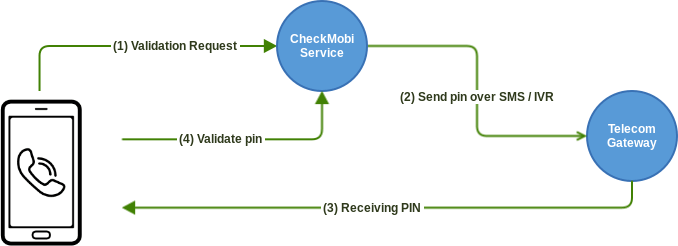
SMS and IVR provide straightforward ways to integrate 2FA (Two-Factor Authentication) into your application. The diagram below illustrates the SMS and IVR validation flow with CheckMobi:
# Missed Call
If you want to reduce validation costs associated with SMS and voice calls, CheckMobi also provides Missed Call (also known as Reverse CLI or Flash Call) validation.
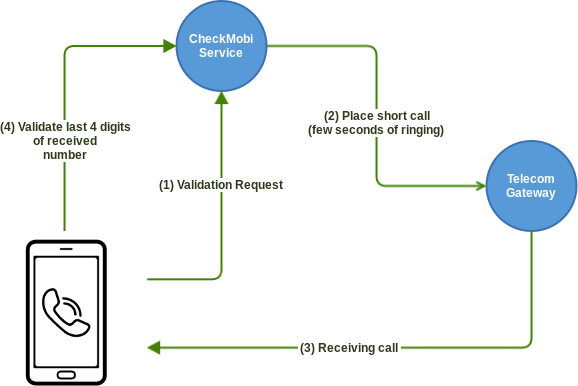
This method uses a missed call placed by CheckMobi to the user's phone number. To validate the number, the application submits the last 4 digits of the incoming caller ID as the PIN.
On Android, this process can be automated without user interaction: the application can detect the incoming call, end it before the user answers, and extract the PIN automatically.
On platforms where call interception is not available, the user can retrieve the number from the call history and enter the last 4 digits manually.
The diagram below illustrates the Missed Call validation flow with CheckMobi:
Tips
- On Android, this method can provide a fully automated user experience while maintaining the same validation security level as SMS or IVR.
- A validation is charged only when the user answers the call. Unanswered calls are free within the limits of your subscription.
- On iOS and other platforms where the operating system does not allow call interception, the user must enter the last 4 digits manually.
Implementation
- For Android and iOS you can use the Remote Config SDK (Android (opens new window), iOS (opens new window)) which allows you to integrate 2FA into your app within minutes with minimal coding.
- In case you still want to have your own implementation based on the REST API you can follow the Missed Call Guideline.
# Request Validation
Use this endpoint to initiate a 2FA request using one of the following methods:
Reverse CLI- Validating a user's mobile phone number by using a missed call.SMS- Validating a user's mobile phone number by using SMS.IVR- Validating a user's mobile phone number by using an IVR (interactive voice response).
Warning
By default the Request Validation TTL (time to live) is 60 minutes and you have a maximum of 3 attempts to verify the pin during this period. You can update this values from your application settings page.
REQUEST
- Resource:
/validation/request - Method:
POST - Authentication:
Authorization header - Content-Type:
application/json - Success code:
200
This resource accepts also X-Client-IP HTTP header for properly tracking the End Customer IP when you are using a server-server integration.
PARAMETERS
| Property | Type | Required | Description |
|---|---|---|---|
| number | string | ✓ | The number that has to be validated in E.164 format |
| type | string | ✓ | Validation method to be used. One of the following values: sms, ivr, reverse_cli (for missed call). |
| language | string | Use this property to localize the validation experience. If omitted, the default SMS/IVR text configured in your application settings is used. If a custom configuration exists for the specified language, it takes precedence over the default. For IVR validations, language takes precedence over the selected voice type (man or woman). See IVR Languages & Voices sections below for more details. | |
| notification_callback | string | Set this parameter to the fully qualified URL where to receive notifications with the completed validations in real-time. Please see the Notification Callbacks section below. | |
| platform | string | The client platform. Supported values are ios, android, web, and desktop. We strongly recommend providing this value for more accurate analytics. | |
| android_app_hash | string | In case you are sending messages from Android and you want to use the SMS Retriever API<#> {MESSAGE}\n {ANDROID_APP_HASH} in order to have the SMS Retriever API working. |
RESPONSE
| Property | Type | Description |
|---|---|---|
| id | string | Unique identifier of the validation request. |
| type | string | Validation method as requested. |
| pin_hash | string | For Reverse CLI validation only. SHA1 over the last 3 digits of the incoming call. This can be used to identify the correct incoming call did by the user. |
| validation_info.country_code | string | Country prefix from where the number belongs. |
| validation_info.country_iso_code | string | The country code from where the number belongs in ISO 3166-1 alpha-2 |
| validation_info.carrier | string | The name of the carrier from where the number belongs. |
| validation_info.is_mobile | bool | Indicates if number is mobile or not. |
| validation_info.e164_format | string | The number in E.164 format |
| validation_info.formatting | string | The number formatted in E.164 format |
REQUEST
RESPONSE
# Notification Callbacks
If you provide the notification_callback parameter, CheckMobi sends an HTTP POST request to the specified URL when the user completes the validation.
Your callback endpoint must return HTTP status 200 OK. If CheckMobi receives a different status code, the notification will be retried up to 3 times.
The request body is JSON-encoded and contains the following properties:
| Property | Type | Description |
|---|---|---|
| key | string | Unique identifier of the validation request (as it was received in response). |
| number | string | The number that was validated in E.164 format |
| description | string | A short description about carrier and country: for example: FR - Orange. |
Note
In case you want to make sure that the notification is not triggered from an untrusted source you can use the X-CheckMobi-Signature header as described here.
# SMS Languages
CheckMobi supports all ISO-639-1 language codesApplications -> [Your application name] -> SMS and add your translations under Localized Templates. When creating a Validation request, set the language parameter to the corresponding ISO-639-1 code. For example, use en for English or it for Italian.
# IVR Languages & Voices
| Language | Value | WOMAN Voice | MAN Voice |
|---|---|---|---|
| Danish | da-DK | ✓ | |
| Dutch | nl-NL | ✓ | ✓ |
| English - Australian | en-AU | ✓ | ✓ |
| English - British | en-GB | ✓ | ✓ |
| English - USA | en-US | ✓ | ✓ |
| French | fr-FR | ✓ | ✓ |
| French - Canadian | fr-CA | ✓ | |
| German | de-DE | ✓ | ✓ |
| Italian | it-IT | ✓ | ✓ |
| Polish | pl-PL | ✓ | ✓ |
| Portuguese | pt-PT | ✓ | |
| Portuguese - Brazilian | pt-BR | ✓ | ✓ |
| Russian | ru-RU | ✓ | |
| Spanish | es-ES | ✓ | ✓ |
| Spanish - USA | es-US | ✓ | ✓ |
| Swedish | sv-SE | ✓ |
# Verify PIN
Use this endpoint to verify the PIN submitted by the user for an SMS, IVR, or Missed Call (Reverse CLI) validation request.
REQUEST
- Resource:
/validation/verify - Method:
POST - Authentication:
Authorization header - Content-Type:
application/json - Success code:
200
PARAMETERS
| Property | Type | Required | Description |
|---|---|---|---|
| id | string | ✓ | Unique identifier for the Validation Request. |
| pin | string | ✓ | The PIN as inserted by the user. |
| use_server_hangup | boolean | Optional, default is false. In case of a Reverse CLI validation (missed call) if you send this flag with true the call will be closed from the server. Some carriers when the call is rejected from the phone (client side) will charge the caller because they answer the call in background and play all kinds of message like: user is busy for example. In order to avoid being charged in this scenarios you can set this flag on true and make sure the client is configured properly to not hangup the call as well. |
Note
For Missed Call (Reverse CLI) the PIN number is represented by the last 4 digits of the incoming call number.
RESPONSE
| Property | Type | Description |
|---|---|---|
| number | string | The number associated with the Validation Request. |
| validated | boolean | Indicates if the PIN was correct or not. |
| validation_date | integer | The date time as UNIX timestampnull. |
| charged_amount | float | The amount charged for that validation (in case the charged amount is available at that time). For Reverse CLI only in case the user is fast enough to answer the call you are charged for 1 minute on that destination. |
REQUEST
RESPONSE
# Get Validation Status
Use this endpoint to retrieve the current status of a validation request.
REQUEST
- Resource:
/validation/status/{id} - Method:
GET - Authentication:
Authorization header - Success code:
200
RESPONSE
| Property | Type | Description |
|---|---|---|
| number | string | The number associated with the Validation Request. |
| validated | boolean | Indicates if the request was validated or not. |
| validation_date | integer | The date time as UNIX timestampnull. |
| charged_amount | float | The amount charged for that validation (in case the charged amount is available at that time). For Reverse CLI only in case the user is fast enough to answer the call you are charged for 1 minute on that destination. |
REQUEST
RESPONSE
# Get Remote Config Profile
Use this endpoint to retrieve the Remote Config profile configured in the web portal for a specific destination.
REQUEST
- Resource:
/validation/remote-config - Method:
POST - Authentication:
Authorization header - Content-Type:
application/json - Success code:
200
PARAMETERS
| Property | Type | Required | Description |
|---|---|---|---|
| number | string | ✓ | The destination number to validate, in E.164 format. |
| platform | string | ✓ | The client platform. Supported values are ios, android, web, and desktop. We strongly recommend providing this value for more accurate analytics. |
| language | string | Use this property to localize the validation experience. If omitted, the default SMS/IVR text configured in your application settings is used. If a custom configuration exists for the specified language, it takes precedence over the default. For IVR validations, language takes precedence over the selected voice type (man or woman). See Supported voices and languages for IVR from Request Validation section for more details. |
RESPONSE
| Property | Type | Description |
|---|---|---|
| settings | object | Returns the validation methods in the order in which they should be presented to the user. Each method includes type (the validation method), max_attempts (the number of attempts before moving to the next method), and delay (the time to wait for the method to complete). |
| country_code | string | Country prefix from where the destination number belongs. |
| country_iso_code | string | The country code from where the destination number belongs in ISO 3166-1 alpha-2 |
| carrier | string | The name of the carrier from where the destination number belongs. |
| is_mobile | bool | Indicates if destination number is mobile or not. |
| e164_format | string | The destination number in E.164 format |
| formatting | string | The destination number formatted in E.164 format |
Note
For sms validation, the API also returns the following properties:
sms_template- The message template that will be delivered, as configured in the web portal.android_app_hash- Returned when an app hash is configured in the Remote Config Profile and the platform isandroid. Use this value in the Request Validation API as theandroid_app_hashparameter.